 Creator
OAuth 2.0 Client#
The OAuth 2.0 Client integration authenticates outgoing calls from the platform to an API that hands out access tokens — an ERP, a ticket system, or any web service behind an OAuth 2.0 token endpoint. Before a call, the platform fetches a token from the token endpoint with the configured client credentials and sends it in the Authorization header. Tokens are reused until shortly before they expire.
It is used by HTTP nodes in Flows, either picked directly on the node or inherited from the Web Service integration the node calls.
Note
This integration is for calling other systems. To let users log in to mybusiness AI with an OAuth provider, use OAuth 2.0 SSO instead.
Where to find it#
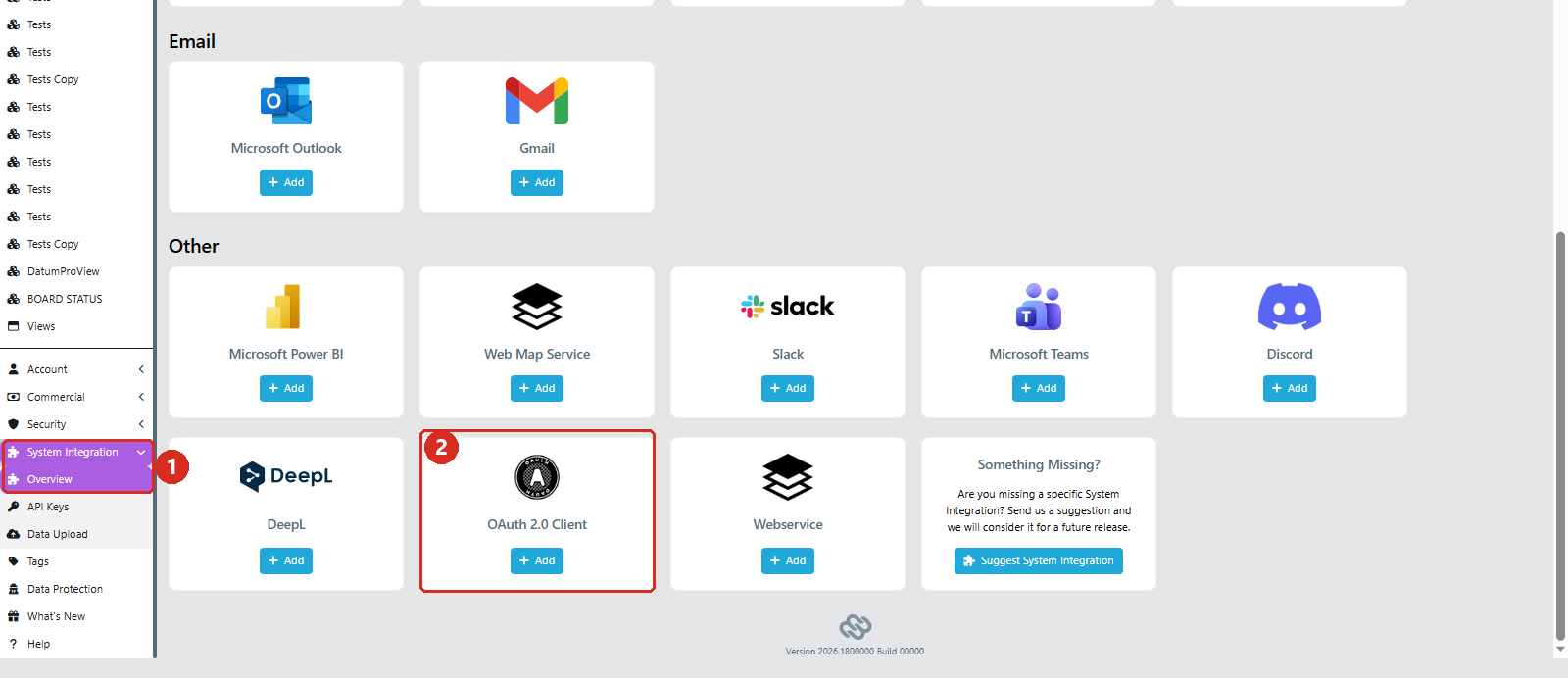
Open System Integration in the menu on the left (1) and add the OAuth 2.0 Client tile in the Other section (2).
Configuration#
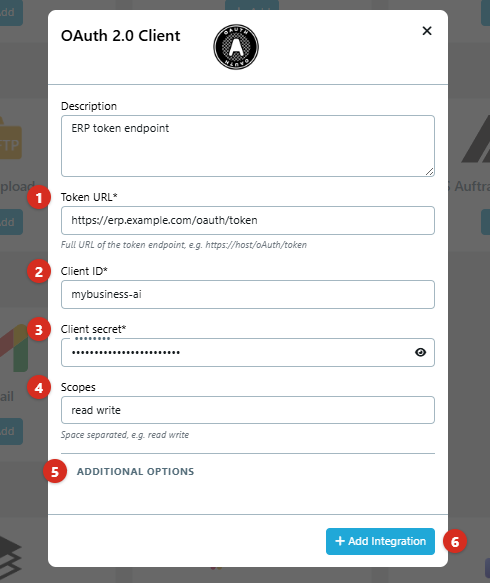
- Token URL: the full URL of the token endpoint, e.g.
https://host/oAuth/token. - Client ID: the id of the OAuth client registered at the provider.
- Client secret: stored encrypted and never sent back to the browser.
- Scopes: space separated, e.g.
read write. - Additional options: everything below, from the grant type to extra parameters.
- Add Integration saves it. Test connection appears afterwards.
Additional options#
- Grant type: Client Credentials (default) or Resource Owner Password. With Resource Owner Password, enter the Username and Password of the account that owns the resources; the password is stored encrypted like the client secret.
- Client authentication: how the client id and secret are sent — in the Request body (
client_secret_post, default) or as a Basic Auth header (client_secret_basic). - Audience and Resource: only needed when the provider requires the
audienceorresourceparameter. - Additional parameters: extra form parameters as a query string, e.g.
tenant=DE08&company=1000. - Skip TLS verification: only for internal hosts whose certificate authority is unknown to the platform.
Testing the connection#
Save the integration, then click Test connection. The platform requests a token and reports whether it succeeded, together with the HTTP status and the body the token endpoint returned, so a rejected client or a wrong scope can be read directly from the provider's answer. Token values are hidden, and the response is not stored anywhere.
Editing an existing integration#
A saved client secret or password does not have to be entered again to change another setting. The field shows a placeholder; leave it unchanged to keep the stored value, or enter a new one to replace it.
Using it in a Flow#
- On a Web Service integration, select the OAuth 2.0 Client under OAuth 2.0 authentication. Every HTTP node that calls this web service is then authenticated with a token from that integration.
- On an individual HTTP node, OAuth 2.0 Authentication picks an integration for that node alone. It replaces the node's own
Authorizationheader. Leave it empty to use the setting of the web service.
The token is requested when the node runs and reused until it expires — or for 60 seconds when the provider does not report an expiry. A failed token request fails the node; the run log shows the reason, with the token masked.
See Integration Hub