Calendar#
The audit calendar is compiled on each request from three inputs:
- The planning rules on published checklists
- The organization tree
- The responsibility matrix
Dates are not stored and are not entered anywhere. Changing a planning rule changes the calendar immediately.
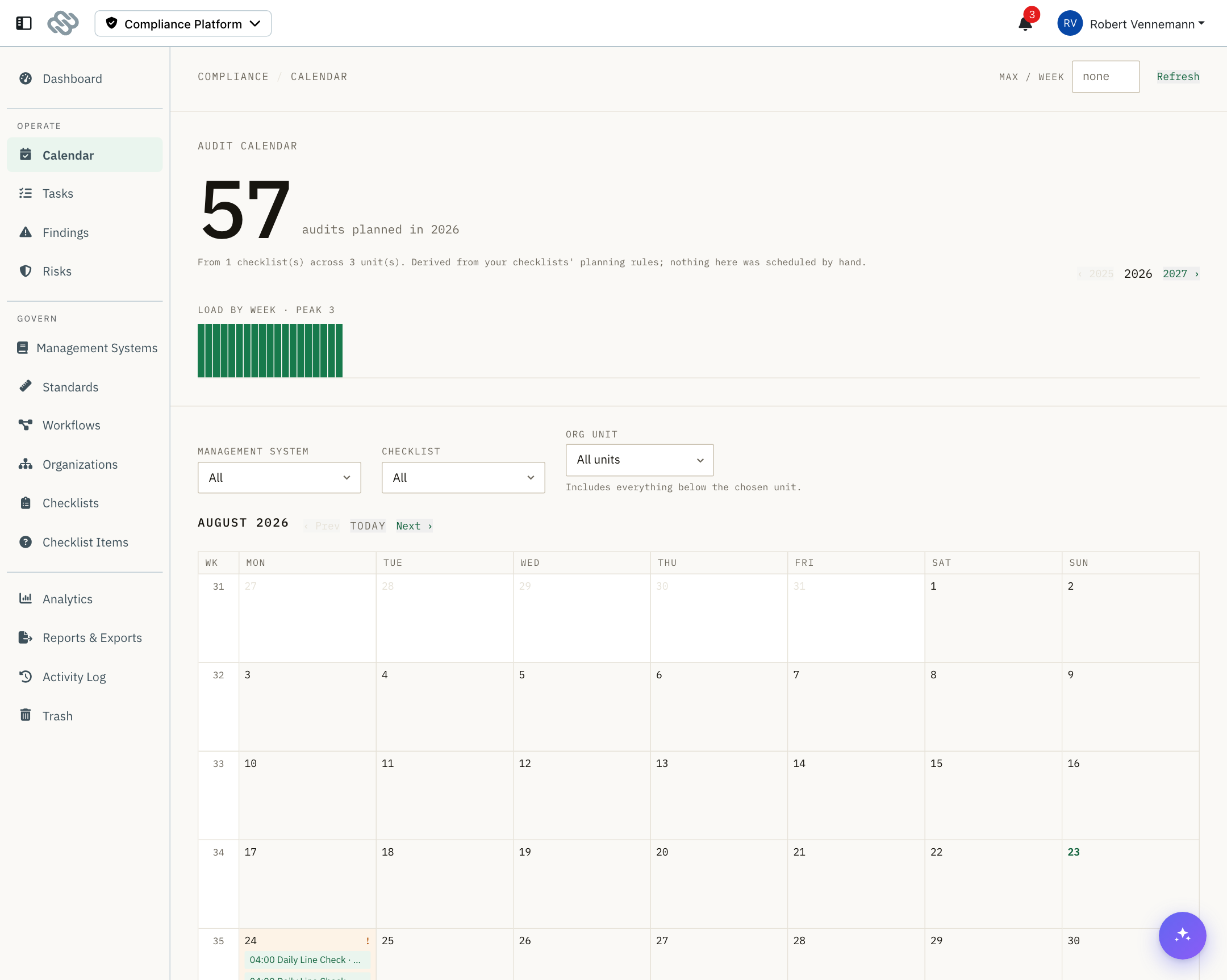
Header#
| Control | Purpose |
|---|---|
| Max / week | Your weekly throughput cap. Weeks above it are marked as overloads. Leave blank for no cap. |
| Refresh | Rebuilds the calendar. |
| Year arrows | Move between years. |
The figure at the top shows how many audits are planned in the selected year, from how many checklists and across how many units.
The calendar covers current and future dates only, because it is recompiled from the rules in force today. What actually happened is held on the tasks themselves. Completed and current audits are in Tasks.
Load by week#
A bar per ISO week for the whole year, with the peak value stated above it.
When Max / week is set, weeks above the cap are marked and counted below the chart. Nothing is rescheduled automatically.
Month grid#
Weeks run down the page with the ISO week number in the left column.
Each planned audit is placed on the day its rule names. When the rule sets an hour, the hour is shown. The hour orders entries within a day and is not a deadline; how long the audit is owed for comes from Completed within on the planning rule.
| Control | Purpose |
|---|---|
| Prev / Next | Move by month. |
| Today | Return to the current month. |
Days holding a planning conflict are tinted and marked with an exclamation mark.
Filters#
| Filter | Behavior |
|---|---|
| Management system | Exact match. |
| Checklist | Exact match. |
| Org unit | Includes everything below the selected unit. |
Filters apply to the compiled year and narrow what is displayed. They do not change what is planned. Select Clear filters to reset.
Filters also apply to the conflicts, rules and gap panels below the grid.
Conflicts#
Audits that cannot both happen as planned. Each entry shows the date, the conflict type, the person, the units involved and the checklists.
| Conflict | Meaning |
|---|---|
| Double booked | One person is assigned two audits on the same day. |
| Planned twice | The same audit is planned twice. |
Conflicts are reported only. To resolve one, change a checklist's planning rules.
Rules in force#
Every planning rule the calendar was compiled from, written as a sentence, broadest first.
The checklist name links to its designer, where the rule can be edited. The list itself is read-only.
Needs attention#
Checklists that produce no calendar entries, or produce entries that cannot run. Each entry links to the checklist.
| Gap | Meaning | Fix |
|---|---|---|
| Draft, not in effect | The checklist has never been published. | Publish a revision. |
| Not planned | The checklist has no planning rules. | Add a planning rule in the designer. |
| Matches nothing | The rule's scope matches no unit at that level. | Widen the scope, or add the units. |
| No responsible | The matched unit has no Auditor for that management system. | Set the Auditor in the responsibility matrix. |
| No questions | The checklist has no questions. | Add questions in the designer. |
| Pool too small | A drawing checklist requests more questions than the pool holds. | Add bank questions, or reduce the draw size. |
Notes and limits#
- The calendar looks forward only. Past and completed audits are in Tasks.
- Overloads and conflicts are reported, never resolved. Nothing is moved automatically; change a planning rule to resolve one.
- No holiday or shift calendar. Planning does not know about public holidays, shutdowns or shift patterns. An audit that falls on one can be recorded as missed with a reason, see Tasks.