Findings and CAPA#
A finding is a recorded non-conformance and the anchor of a case. It carries a case reference such as C-2026-0184, and the corrective work that follows belongs to that case.
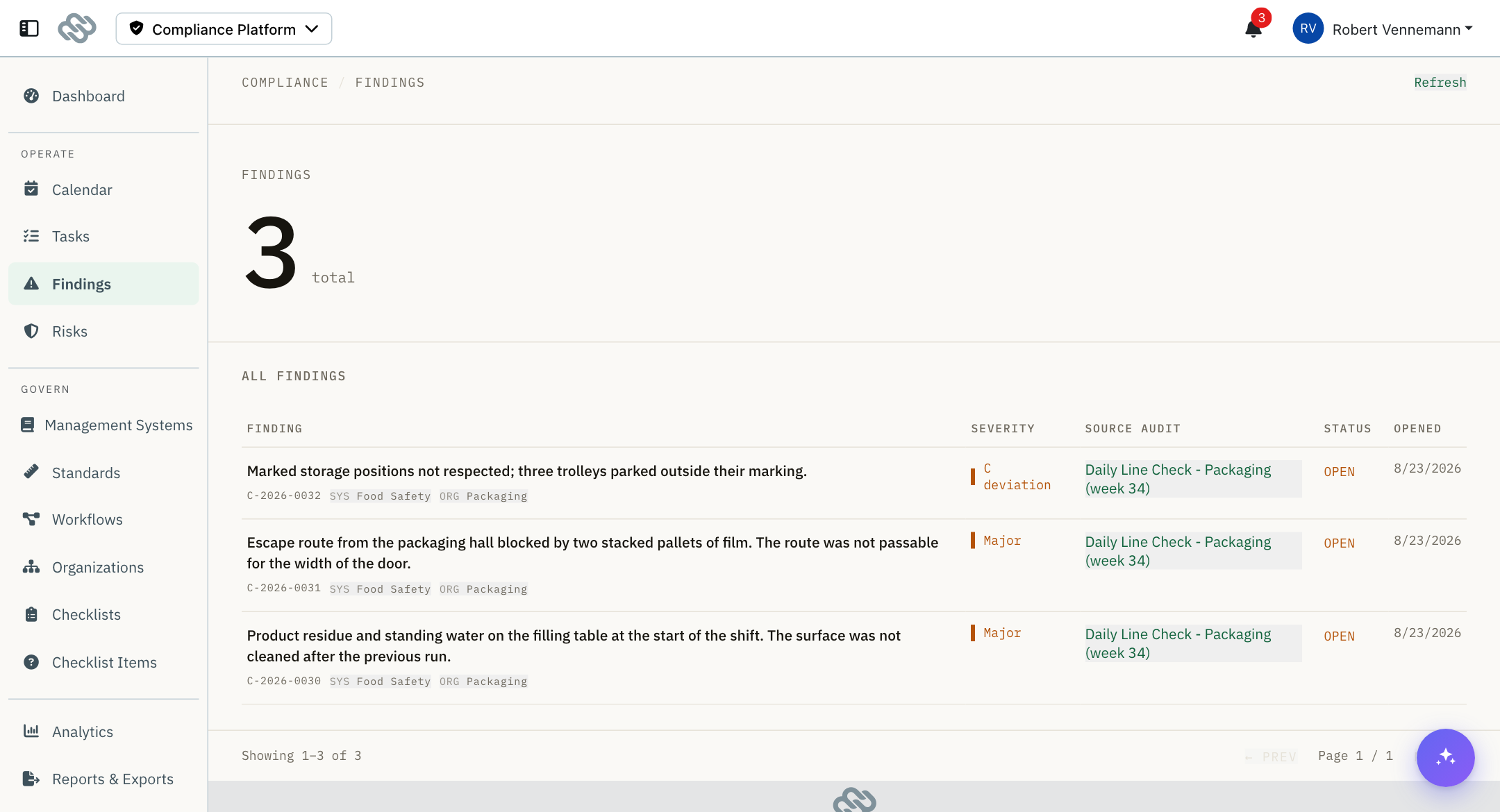
The findings list#
| Column | Content |
|---|---|
| Finding | The description, with its case reference and relationship pills. |
| Severity | The grade, with a KO marker for knock-out grades. |
| Source audit | The audit the finding was raised on. |
| Status | Open, Resolved or Closed. |
| Opened | The date the finding was created. |
| Status | Meaning |
|---|---|
| Open | Corrective work is due or in progress. |
| Resolved | The work is complete and the finding is not yet closed. |
| Closed | Complete and verified. |
Select a relationship pill on a row to filter the list to that management system, org unit or risk item. Select the filter indicator above the table to clear it.
Select a row to open the finding.
The finding page#
Graded observation#
Read-only. Shows what was recorded and what the standard requires:
- The case reference and the grade, with a KO badge where applicable
- The clause that was breached
- The description of the non-conformity
- What the standard requires for the grade
- The deadline, set when the finding was graded
- A link to the source audit
- The clause the grade's consequence comes from
Once a finding exists, its grade, deadline and CAPA route are fixed, and its wording is fixed as soon as the audit is submitted or the finding is committed. That is what makes the case defensible later: the record shows the grade that was given at the time, and the deadline that followed from it, with no way to soften either after the fact.
To change how an answer is graded in future audits, change the question's non-conformance rule. See Checklist items.
Case tree#
The chain the finding belongs to: the audit above it and every corrective task beneath it.
Root cause#
Shown when the finding's CAPA route includes a root-cause step.
The analysis is recorded by completing the route's root-cause task, not on this page. The panel shows the analysis text, the method used, and when it was recorded. Select Open analysis to open the task.
Until the task is complete, the panel names the task that owes the analysis and links to it.
Available methods: 5 Whys, Fishbone (Ishikawa), Other.
Corrective actions#
Lists the action tasks attached to the finding with their status and due date. Select one to open its completion form.
To add an action manually, enter a title and select + Add. It defaults its due date to the finding's deadline and assigns it to you. Actions created by the CAPA route are already listed here.
The header states whether all actions are done or work is in progress.
Effectiveness verification#
Shown when the finding's CAPA route includes a verification gate after the implementation step.
The verdict is recorded by completing that gate. Approving records the fix as effective; rejecting sends the corrective action back for rework. The panel shows the verdict, any note, and the verification date. Select Open verification to open the gate task.
Until the gate is reached, the panel names the pending task or states that implementation must be completed first.
Lifecycle actions#
| Action | Available when | Effect |
|---|---|---|
| Mark resolved | Status is Open. | Sets the status to Resolved. |
| Close finding | Status is not Closed, and effectiveness has been verified where the route requires it. | Sets the status to Closed. |
| Reopen | Status is Closed. | Sets the status back to Open. |
Closing is blocked until effectiveness has been verified. The button states this when disabled.
Working a CAPA step#
Opening a corrective action, root-cause task or gate from Tasks or from the finding page opens the task completion form.
The form shows the chain the task belongs to, the case tree, and an evidence panel.
| Section | Content |
|---|---|
| Evidence | An optional note and up to 8 photos. |
| Analysis method | Shown on a root-cause step. The note is the analysis, and both are copied onto the finding when the step completes. |
| Decision | Shown on a gate. States what is being judged and what each outcome does. |
| Step type | Actions |
|---|---|
| Gate | Two actions: approve or reject. On a plan-review gate, approving advances the route and rejecting returns it to the step under review. On a verification gate, approving records the finding as verified effective and rejecting returns the corrective action for rework. |
| Any other task | Mark complete. |
Notes and limits#
- Findings are raised during an audit, when an answer matches a non-conformance rule. There is no way to add one directly from this list.
- A rejected gate has no rework limit. The route returns to the preceding step and can repeat any number of times.
- No text search. The list is filtered by management system, org unit, risk item and case.