 Ultimate
OAuth 2.0 SSO#
OAuth 2.0 Single Sign-On lets users log in to mybusiness AI through an OAuth-based identity provider.
Configuration#
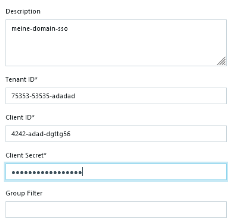
The integration usually contains the following settings:
- OAuth URL: the authorization endpoint of the identity provider.
- Tenant ID: the tenant, realm, or pool identifier used by the provider.
- Client ID: the public client identifier.
- Client Secret: the protected secret for the OAuth client.
- Group Filter: an optional filter for limiting which provider groups are allowed or mapped.
Post-Login Redirect and iframe Use#
Some OAuth-based SSO integrations can also define:
- Post-Login Redirect URL: sends the user to a specific URL after the SSO login has completed.
- Used in iframe: keeps the login flow inside the iframe when mybusiness AI is embedded in another application.
Use Post-Login Redirect URL when users should return to a specific external page or embedded experience after authentication. Use Used in iframe only when the identity provider and the embedding application both support iframe-based login.
Editing Existing SSO Integrations#
When an SSO integration already has a saved client secret, the secret does not need to be entered again just to update another setting. Leaving the secret field unchanged keeps the stored value. Enter a new client secret only when the secret should be replaced.
See Integration Hub