Tasks#
Tasks lists audits, corrective actions and plain to-dos in one place, grouped by due date.
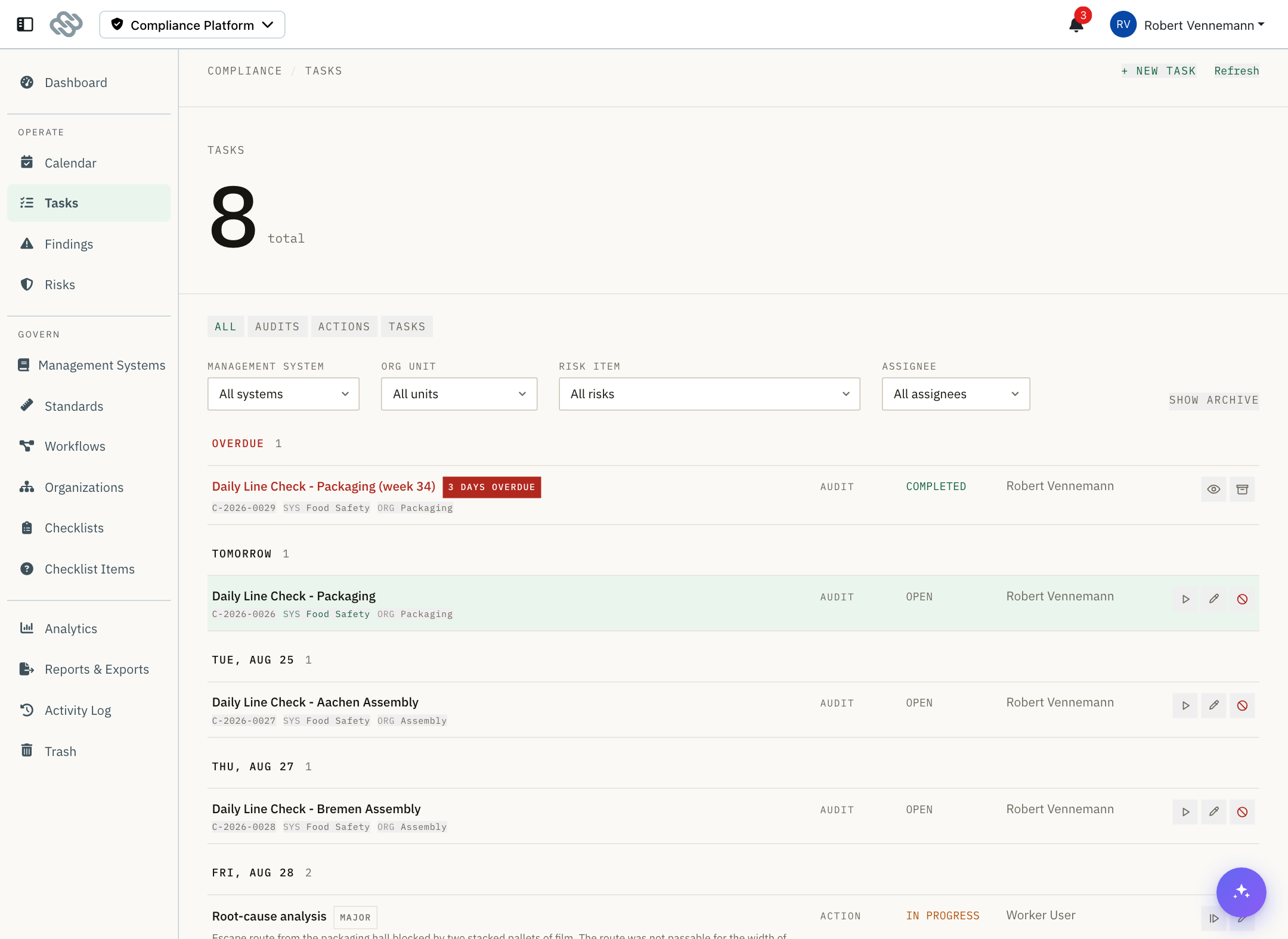
Groups and status#
Rows are grouped by due date: Overdue first, then Today, Tomorrow, then each upcoming day.
An overdue row carries a badge stating how late it is.
| Status | Meaning |
|---|---|
| Planned | Generated ahead of time from the calendar. Not yet actionable and excluded from the open-work views. |
| Open | Due and ready to start. |
| In progress | Started and not yet finished. |
| Completed | Finished. |
| Missed | Was due, and the period passed. Counted against the plan. |
Status is set by the platform and cannot be edited directly.
Task types#
| Type | Description | Worked in |
|---|---|---|
| Audit | Runs against a published checklist. | The audit runner |
| Action | A CAPA step, corrective or preventive. | The task completion form |
| Task | A to-do with no checklist. | The task completion form |
Use the type filter above the list to show one type.
Filters#
| Filter | Behavior |
|---|---|
| Management system | Exact match. |
| Org unit | Includes everything below the selected unit. |
| Risk item | Exact match. |
| Assignee | Exact match. |
| Case | Set by selecting a case reference on a row. |
Each row also shows its relationships as selectable pills beneath the title: the case reference, Sys for management system, Org for org unit and Risk for risk item. Selecting a pill applies the same filter as the dropdown. Selecting the active pill clears it.
Select Clear filters to reset all filters. This does not affect the archive view.
Row content#
Besides the title, a row can show:
- The grade of the finding a corrective action belongs to, with a KO marker for knock-out grades
- The finding the step belongs to
- The step's position in its CAPA route
- The recorded reason, for a task marked missed or deleted
- An Archived marker, when the archive is in view
Row actions#
| Action | Available when |
|---|---|
| Start | The task is open. |
| Resume | The task is in progress. |
| View results / View evidence | The task is completed. Opens it read-only. |
| Edit | The task is editable. Not available for a submitted audit. |
| Archive | The task is finished. |
| Restore | The task is archived. |
| Not done | The task has not been started. |
Marking a task not done#
A task cannot be deleted directly. Select the not-done action and choose an outcome. This keeps the audits-versus-plan figure honest: work that was owed and not done stays visible with the reason it was not done.
| Outcome | Effect |
|---|---|
| Missed | The task stays on the record and continues to count against the plan. |
| Delete | The task moves to the Trash, carrying its reason. |
Then select a reason. Only reasons valid for the chosen outcome are offered.
| Reason | Valid for |
|---|---|
| No reason given, Absent, On leave, Public holiday, Production downtime, Company holidays | Missed |
| Duplicate, Created in error, No longer applicable | Delete |
| Other | Both. A note is required. |
A note can be added for any reason and is required for Other.
The reason is shown on the row beneath the status.
Archive#
Completed tasks are archived automatically 14 days after they close. Select Archive on a row to archive it sooner, and Restore to bring it back to the list.
Select Show archive to include archived tasks in the view. This reloads the list and is not reset by Clear filters.
Create a task#
Select + New task and choose the type first.
| Type | Required fields |
|---|---|
| Task | Title, assignee |
| Audit | Title, assignee, a published checklist |
| Action | Title, assignee, subtype (corrective or preventive) |
Optional for all types: description, org unit, risk item, parent task, Due from and Due by. Management system is available for Task and Action; an audit takes it from its checklist.
When selecting a checklist for an audit, use the management-system dropdown above the checklist field to narrow the list. Only published checklists are offered. If a management system has drafts only, the form states how many and links to the checklist list.
The task is created automatically once the required fields are set. The footer states what is still missing. Closing the drawer with an incomplete task asks for confirmation before discarding it.
Set a Parent task to nest a task under another. A task cannot be nested under itself or its own descendants. Child tasks are listed read-only when editing a parent.
Notes and limits#
- No bulk actions. Tasks are started, archived, edited and marked not done one at a time.
- A task's type cannot be changed after it is created.
- Due from and Due by are dates, not times. For a planned audit the time window comes from the checklist's To be completed within setting.
- Completed tasks archive after 14 days. The grace period is fixed.