Business Objects Filters#
You can filter Business Objects based on their properties.
Depending on the property you are filtering there are different operators you can choose from (see below). Operators are case-insensitive.
When multiple filter expressions are set, they are combined using the logical AND operator. Only the Business Objects matching all filters will be shown. For example, filtering by a Text property containing "Problem" and a Status property equaling "Danger" will only show objects that match both conditions.
Currently, there is no support for concatenating multiple filters using an
ORlogic.
Operators#
| Operator | Meaning | Example |
|---|---|---|
Equals / = |
Property equals a value | Name equals John, Age equals 42 |
Not Equals / ≠ |
Property does not equal a value | Status does not equal deleted |
| Starts With | Property starts with a value | Name starts with Jo |
| Contains | Property contains a value; applies to strings (substring match) and collections | Description contains important |
| Not Contains | Property does not contain a value | Description does not contain test |
> / After |
Property is greater than a value (numeric or date/time properties only) | Age > 18, Date after 2023-01-01 |
≥ / After or Equals |
Property is greater than or equals a value (numeric or date/time properties only) | Price ≥ 100 |
< / Before |
Property is less than a value (numeric or date/time properties only) | Quantity < 10, Date before 2023-12-31 |
≤ / Before or Equals |
Property is less than or equals a value (numeric or date/time properties only) | Stock ≤ 5 |
| Range | Property is between (inclusive) two values (numeric or date/time properties only) | OEE between 0.8 and 1.0 |
| In / Is | Property is part of a collection of possible values | Status is one of warning, error |
| Not In / Is Not | Property is not part of a collection of possible values | Status is not archived or deleted |
| Empty | Property has no value (null, empty string, or empty collection) | Errors is empty |
| Not Empty | Property has a value | Description is not empty |
| Me | User property equals the current user (also matches the current user's groups) | Assignee is me |
| Not Me | User property does not equal the current user | Assignee is not me |
Empty, Not Empty, Me, and Not Me do not require a value — selecting the operator is sufficient.
Operators by Property Type#
Not all operators are available for every property type. The table below shows which operators apply to each:
| Property Type | Available Operators |
|---|---|
| Text, Long Text, Address, Phone, Email, Scan, Link | Equals, Not Equals, Starts With, Contains, Not Contains, Empty, Not Empty |
| Number, Progress | Equals, Not Equals, >, ≥, <, ≤, Range, Empty, Not Empty |
| Date, Date & Time, Time | Equals, Not Equals, After, After or Equals, Before, Before or Equals, Range, Empty, Not Empty |
| Boolean | Is, Is Not, Empty, Not Empty |
| Selection, Multiple Selection, Status, Stages | In, Not In, Empty, Not Empty |
| Relationship (One-to-One, One-to-Many, Many-to-One, Many-to-Many) | In, Not In, Empty, Not Empty |
| User | In, Not In, Me, Not Me, Empty, Not Empty |
Range for Time Properties#
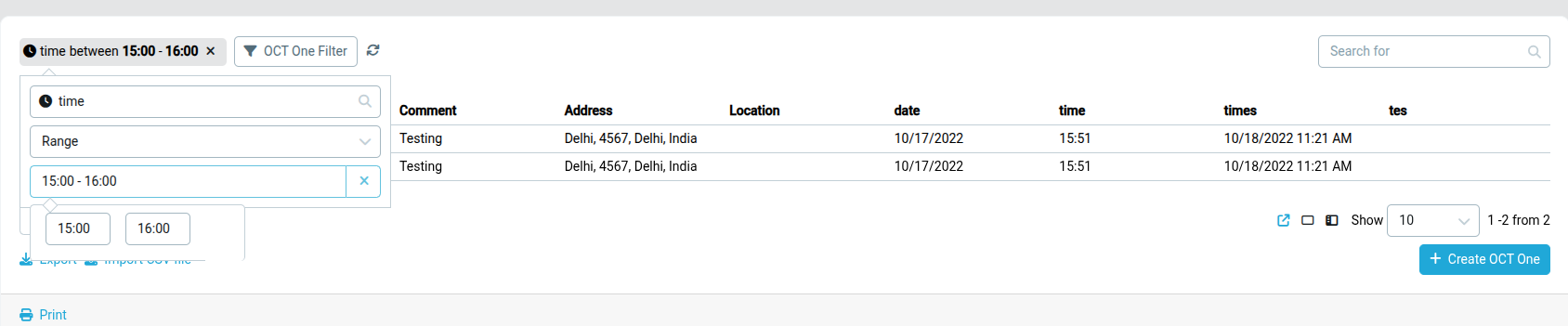
The Range operator can be used with date and time-based properties to filter values within an inclusive interval.
Developers and API users: see the API Filter Syntax for the full technical reference including property path format, value types, and request syntax.